macOS app / 2026 / In progress
Omitto.
A Mac app that hides the sensitive parts of developer text on the Mac itself, and never shows a result made from older text
- The hard part
- Scanning text in the background, but never offering a cleaned copy of text that was edited while the scan ran.
- Works today
- The Mac app finds secrets, shows each one for review and copies a safe version. I have not yet measured how fast it is.
- Role
- Software engineering
- Built with
- Swift · SwiftUI · Foundation · Swift Package Manager · XCTest
01What I built
The problem.
A log is the record a program writes as it runs. Before a log or a piece of a settings file is shared, the sensitive parts have to come out. But the layout that makes it useful has to stay. The tool must also never offer a redacted copy of text that has since been edited. Scanning in the background makes that harder, because a slow scan can finish after the text has changed.
What I built.
Omitto is a macOS app built around RedactionCore, a separate package of code that does the text work. The app does everything else. It starts each scan in the background and decides whether to accept the result. It shows the findings, the sensitive bits the scan found, for review. There I can choose Keep, which leaves that piece of text as it was without hiding it. I can also add phrases of my own to hide. It copies the result only when asked. An optional timer clears the clipboard afterwards, but only if Omitto’s copy is still the item on it.
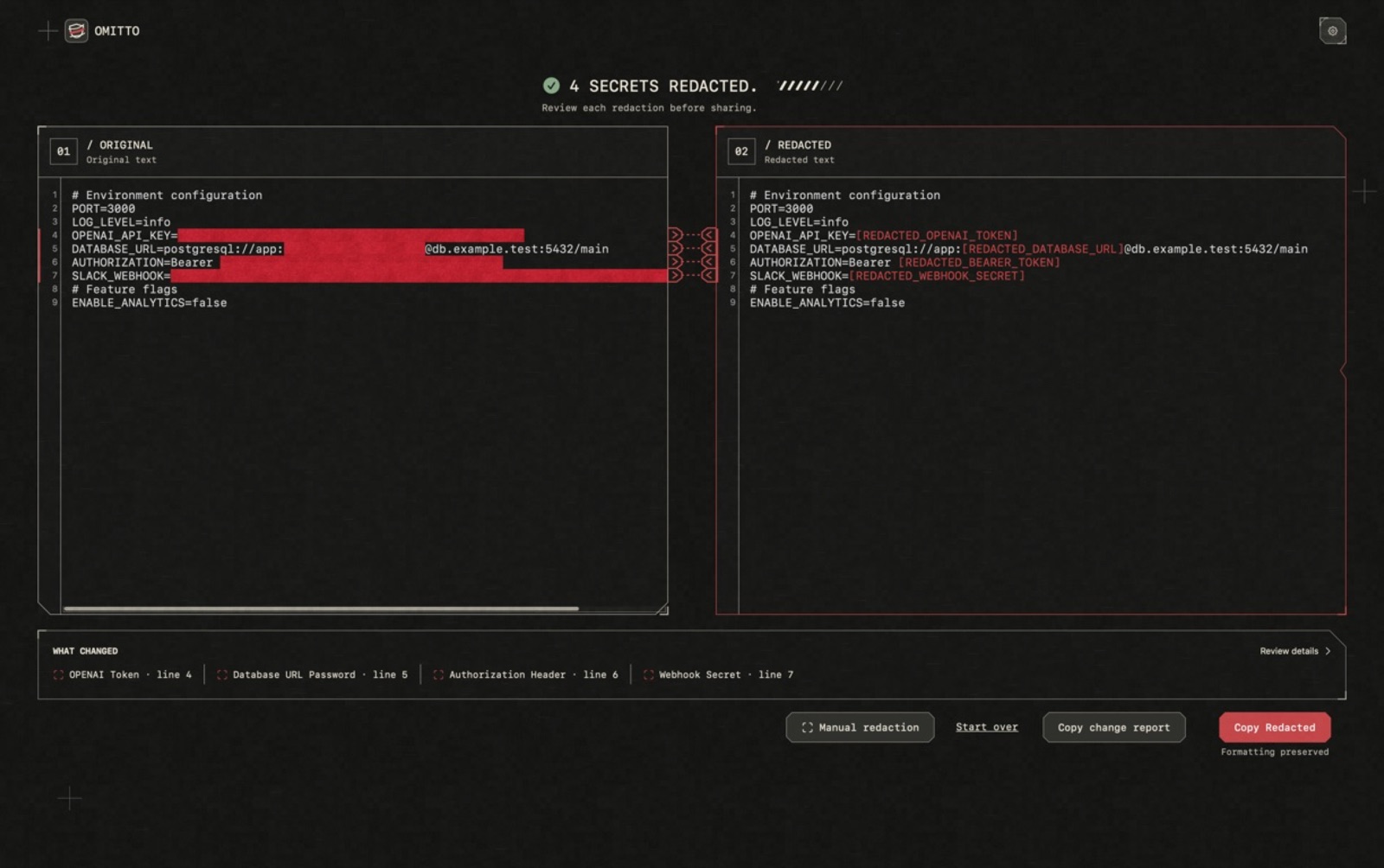
The app
Swift, SwiftUI, Foundation
- Screen state
- Holds the text that goes in and the result that comes out, plus the findings and the review choices. It all lives on the main actor, the part of Swift that runs the screens.
- Background scan
- Takes a copy of the text and the policy under a new generation number, a count that goes up with each scan. Then it runs RedactionCore as a detached task, a separate job in the background.The storyMaking sure a background scan still matches the text on screen
- Result check
- Shows a result only if the generation number and the text still match, and the scan was not cancelled.The storyMaking sure a background scan still matches the text on screen
- Edit reset
- Any edit clears the old output, findings and report. It also clears the Keep choices, so the text must be scanned again.
- Clipboard service
- Copies only when asked. Its timed clear runs only if the pasteboard change count, which goes up with every copy, has not moved.
The package
Swift, Foundation, Swift Package Manager, XCTest
RedactionCore- Main call
- One call takes text and a policy, does the whole job, then returns the redacted text, the findings and a report.
- Detectors
- Gathers the stretches of text that every detector suggests, and removes repeats.
- Overlap resolver
- Drops disabled groups first. Then it picks winners by priority, by how sure each match is, and by length.The storyStopping a disabled detector from beating an enabled one
- Placeholders
- Gives repeated values one shared placeholder within a call. Different values of the same kind get different numbers.
- Text replacement
- Edits the text from the end backwards, so earlier positions stay correct. It counts positions in UTF-16 units, a standard way of numbering the characters in text.
- Findings
- Each finding says where the match is, what kind it is, and how sure the scan is. It also gives a reason and a preview with the value hidden. It never holds the original value.
02The journey
What broke, and what changed.
Broke, then fixedA decisionA milestone
- 01 of 08DecidedOmitto
Moving the scan to the background without losing track
The questionScanning ran on the main actor, the part of Swift that also runs the screens. Moving it to the background raised a new problem. A scan could finish after the text changed, or after a newer scan began.
What I choseEach scan now takes a copy of the text and the policy, with a generation numberOmitto · The appBackground scanTakes a copy of the text and the policy under a new generation number, a count that goes up with each scan. Then it runs RedactionCore as a detached task, a separate job in the background.See it in the map above, a count that goes up with each scan. It then runs as a detached task, a separate job in the background. Its result is shown only if the number and the captured textOmitto · The appResult checkShows a result only if the generation number and the text still match, and the scan was not cancelled.See it in the map above still match. The task must also not have been cancelled.
- 02 of 08DecidedOmitto
An edit throws the old review away
The questionAfter an editOmitto · The appEdit resetAny edit clears the old output, findings and report. It also clears the Keep choices, so the text must be scanned again.See it in the map above, the old redacted result could stay on screen, ready to copy. Someone would have to notice it no longer matched.
What I choseAn edit now clears the old output, findingsOmitto · RedactionCore · The packageFindingsEach finding says where the match is, what kind it is, and how sure the scan is. It also gives a reason and a preview with the value hidden. It never holds the original value.See it in the map above and report. It also clears the line map and the Keep choices. Copy is switched off while a scan runs. This costs another scan, but what is on screen always belongs to the current text.
- 03 of 08DecidedOmitto
Clear the clipboard only if it still holds my copy
The questionClearing the clipboardOmitto · The appClipboard serviceCopies only when asked. Its timed clear runs only if the pasteboard change count, which goes up with every copy, has not moved.See it in the map above after a set time is useful. But by the time the timer runs, something else may have been copied.
What I choseThe timer checks the pasteboard change count, a number the Mac raises each time anything is copied. If it has moved since Omitto’s copy, the timer leaves the newer item alone. It does not claim to erase clipboard history or the app’s memory. Nor does it erase copies made elsewhere.
- 04 of 08BrokeOmitto
Old personal details could still be found after a history rewrite
What went wrongBefore release, my check looked at the current files. It also looked at the branches and tags on my own computer, which are named points in the code’s saved history. I rewrote those. A July audit then found older personal details behind a pull-request reference. That is a link to a proposed change, and GitHub manages it.
What changedThe check now finds every branch, tag and pull request that GitHub lists, and goes through all of their saved changes. It checks who wrote and who saved each change, and the message on each change. It also checks tags that carry notes, text that looks like a secret, and sensitive file names. I held back publishing while that old history was still there.
- 05 of 08DecidedRedactionCore
Edit the original text instead of rebuilding it
The questionA redaction tool can read the whole file into the program and write it out again. Or it can change only the stretches of text it found.
What I choseRedactionCore changes only those stretches, in the original text. It works from right to leftOmitto · RedactionCore · The packageText replacementEdits the text from the end backwards, so earlier positions stay correct. It counts positions in UTF-16 units, a standard way of numbering the characters in text.See it in the map above, so the positions of earlier matches stay correct. Indentation and comments stay, and so do the order of settings and the line endings. How well it finds secrets is a separate question.
- 06 of 08BrokeRedactionCore
A disabled detector could beat an enabled one
What went wrongA disabled high-priority detectorOmitto · RedactionCore · The packageDetectorsGathers the stretches of text that every detector suggests, and removes repeats.See it in the map above could win an overlapping matchOmitto · RedactionCore · The packageOverlap resolverDrops disabled groups first. Then it picks winners by priority, by how sure each match is, and by length.See it in the map above and then be removed. Nothing was left to replace the value, so it stayed in the text.
What changedMatches from disabled groups are now removed before overlapping matches compete. The enabled detector stays in play and the value is replaced.
- 07 of 08DecidedRedactionCore
Placeholders last for one call, not forever
The questionRepeated values should get the same label, so a result is easy to follow. But a table of values and labels kept forever would tie each label to one value across every document.
What I choseEach call starts a fresh set of placeholdersOmitto · RedactionCore · The packagePlaceholdersGives repeated values one shared placeholder within a call. Different values of the same kind get different numbers.See it in the map above, so repeats share a placeholder inside one result only. If a new placeholder would be the same as the original value, RedactionCore changes it.
- 08 of 08DecidedRedactionCore
The reviewer can overrule the automatic scan
The questionAutomatic detection misses some things and flags others it shouldn’t.
What I choseManual phrases are phrases the user adds by hand. They stay active even with every automatic group switched off. A Keep choice leaves that piece of text as it was, without hiding it. Phrases are used for the current call only and are never saved.
03Today
Where it stands.
The detectorOmitto · RedactionCore · The packageDetectorsGathers the stretches of text that every detector suggests, and removes repeats.See it in the map above is the part of RedactionCore that looks for secrets. Cancelling a scan cannot stop it halfway, so the app throws away the late result instead. I have not yet measured how quickly the app responds. I have not tested scans that overlap either. Working on the Mac itself does not mean every secret is found. It does not mean the app’s memory is wiped either.